
Can You Use an Apple Airtag With an Android Phone?

Apple AirTags are nifty little tracking devices meant for locating items like keys or bags, and they work best with Apple products through the Find My app. Many people wonder if they can use AirTags with Android phones, and the answer is somewhat complicated. You can't actually set up an AirTag using an Android device since that requires an iPhone or iPad.
However, Android users can download Apple's Tracker Detect app to scan for nearby AirTags. They can also utilize NFC to access information about a lost AirTag but cannot track it in real-time once it's paired with Apple devices. So, alternatives like Tile may be better suited for Android users.
Can You Use an Apple AirTag with an Android Phone?
Apple AirTags are small tracking devices designed to help you find lost items like keys, wallets, or bags. They are primarily made to work seamlessly with Apple devices through the Find My app. However, many users wonder if they can utilize AirTags with Android phones. The answer is nuanced, as AirTags can be used with Android, but their functionality is limited.
First and foremost, you cannot set up an AirTag using an Android device. The setup process requires an iPhone, iPad, or iPod touch connected to Apple's Find My network. This is because AirTags rely on this network to function optimally, sending periodic Bluetooth LE signals that help track their location. Android devices do not have access to this network, which means that Android users cannot track an AirTag that has been set up on an Apple device.
While AirTags were designed for Apple devices, Android users can interact with them in a limited capacity, primarily for tracking purposes under certain conditions. Apple has released an app called Tracker Detect for Android users. This app can scan for nearby AirTags and other Find My-compatible devices that are not connected to their owner's device.
However, it does not automatically scan; users must manually prompt it to do so. This is particularly useful for detecting AirTags that might be used to track individuals without their consent.
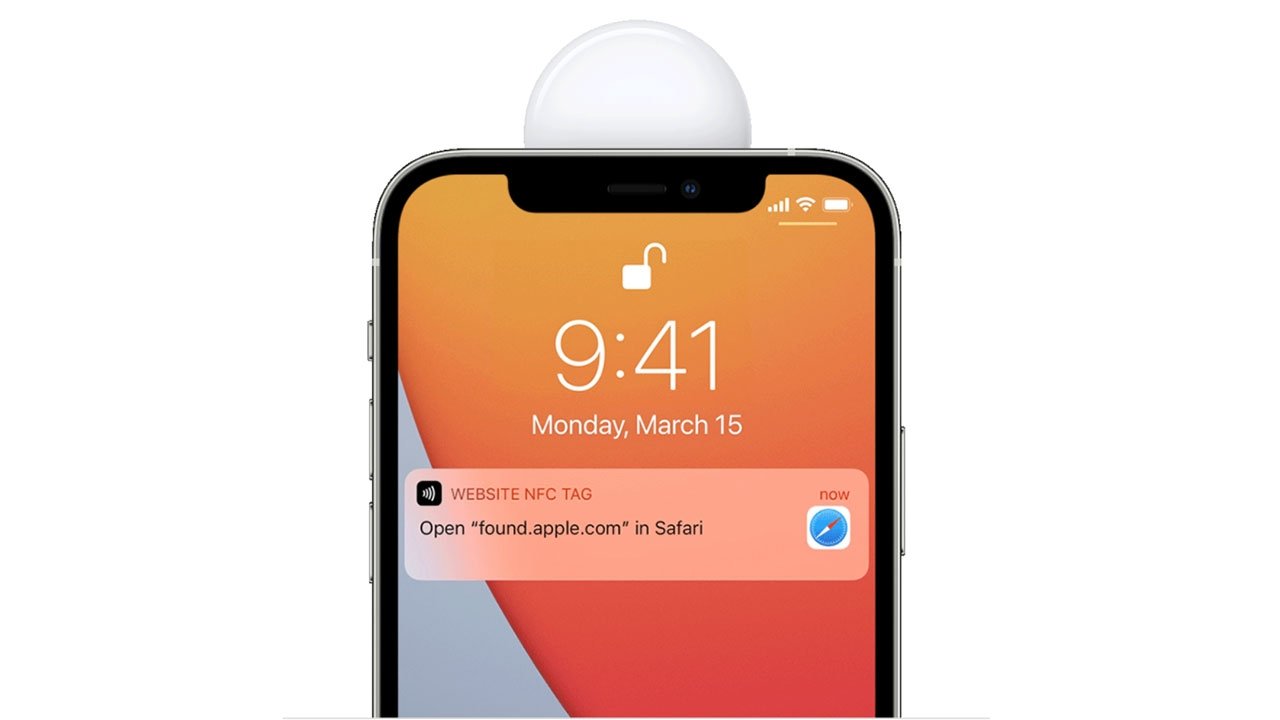
If an Android user finds a lost AirTag, they can scan it using NFC (Near Field Communication). By tapping the white side of the AirTag to their phone, they can access a webpage that provides information about the AirTag, including the owner's contact details if they have marked it as lost. This feature can help return lost items to their rightful owners.
Google has integrated a feature in Android 6.0 and above that alerts users if an unknown tracker, such as an AirTag, is detected moving with them. This feature is automatically enabled, providing an additional layer of security against unwanted tracking.
Despite these functionalities, using AirTags with Android comes with significant limitations. Android users cannot set up AirTags or track them through the Find My app, as this app is not available on Android. Therefore, once an AirTag is paired with an Apple device, an Android phone cannot follow its location.
The Tracker Detect app and unknown tracker alerts do not provide real-time tracking capabilities like the Find My app does on Apple devices. Users are limited to scanning for AirTags that are in proximity or have been marked as lost.
For Android users seeking tracking solutions, alternatives such as Tile trackers or Samsung's Galaxy SmartTag may be more suitable. These devices are designed to work well with Android ecosystems and provide comparable tracking functionalities without the limitations posed by AirTags.
Setting Up AirTags with Android
:max_bytes(150000):strip_icc()/001_using-airtags-with-android-5188775-c196583a65a0449b9c78c512c12d22dc.jpg)
Credits: lifewire.com
To use an Apple AirTag with an Android phone, it's important to note that you cannot set it up directly on an Android device. The initial setup requires an iPhone, iPad, or iPod touch, which connects to Apple's Find My network. This network is crucial for the AirTag's functionality, as it helps in sending Bluetooth signals to track its location. While Android users can't set up AirTags, they can download Apple's Tracker Detect app, which allows them to scan for nearby AirTags and other compatible devices. This is particularly useful for identifying AirTags that may be tracking them without consent.
Additionally, if an Android user finds a lost AirTag, they can use NFC scanning by tapping the AirTag with their phone to access a webpage with the owner's contact information. Despite these capabilities, Android users face limitations, such as the inability to track AirTags in real-time or set them up, making alternative tracking solutions like Tile or Samsung's Galaxy SmartTag more suitable for their needs.
Limited Capabilities for Android Users
Apple AirTags are primarily designed for Apple devices, which means that Android users face some significant limitations when trying to use them. While Android users can interact with AirTags to some extent, they cannot set them up or track them in the same way that Apple users can. For example, the Tracker Detect app allows Android users to scan for nearby AirTags, but this requires manual action and does not provide real-time tracking.
Additionally, if an Android user finds a lost AirTag, they can use NFC to access information about the AirTag, but again, this is a limited interaction compared to the robust features available on Apple devices. Overall, while there are some functionalities available, the experience for Android users is quite restricted.

Using the Tracker Detect App
Credits: engadget.com
The Tracker Detect app is a tool that Apple has created specifically for Android users to help them interact with AirTags. This app allows Android users to scan for nearby AirTags and other compatible devices that might be tracking them without their knowledge. However, it’s important to note that this scanning isn’t automatic; users must open the app and initiate the scan manually. Once the scan is done, it can identify AirTags that are nearby and not connected to any Apple device, which can be helpful for spotting potential unwanted tracking.
Another useful feature of the Tracker Detect app is its capability to alert users about unauthorized tracking. If an AirTag is detected moving with someone who doesn't own it, the app can notify the user, providing an added layer of security. This can be particularly important for those concerned about privacy and safety.
For example, if you find an AirTag that doesn’t belong to you, using the Tracker Detect app can help you quickly identify it. You can scan for the device and, if it has been marked as lost, you can retrieve contact information for the owner by tapping the AirTag with your phone. This functionality, however, is limited to the detection and retrieval aspects, and it doesn't allow Android users to track AirTags in the way Apple users can with the Find My app.
NFC Scanning for Lost AirTags
Credits: appleinsider.com
If an Android user finds a lost AirTag, they can use NFC (Near Field Communication) to scan it. By tapping the white side of the AirTag against their phone, they can access a specific webpage that provides information about the AirTag, including the owner's contact details if the owner has marked it as lost. This function is particularly helpful for returning lost items to their rightful owners. For instance, if you find an AirTag attached to a backpack in a café, simply tapping your phone against it can lead you to a page with the owner's contact info, allowing you to help reunite them with their property. This feature highlights the potential for collaboration between different platforms, even though full functionality remains limited.
Unknown Tracker Alerts on Android
Android devices running version 6.0 or later come with a feature that helps users stay aware of potential tracking devices nearby. This feature automatically detects unknown trackers, like Apple AirTags, that may be moving with you. When an unknown tracker is identified, users receive a notification, which serves as a warning against possible unwanted tracking.
For instance, if someone were to slip an AirTag into your bag without your knowledge, this alert would notify you, giving you the opportunity to take action. This built-in safety mechanism is part of Android's commitment to user privacy and security, making it easier for users to be vigilant about their surroundings.
Moreover, the alerts provide peace of mind, especially in public places where personal safety can be a concern. Users can quickly check for any unfamiliar devices and take the necessary steps to ensure their safety.
Limitations of Using AirTags with Android
Using Apple AirTags with Android phones presents several limitations that users should be aware of. First, Android users cannot set up AirTags. The setup process requires an Apple device connected to the Find My network, which is not accessible on Android. This means once an AirTag is associated with an Apple device, it cannot be tracked or managed by an Android phone.
Moreover, while Apple offers the Tracker Detect app for Android, it provides only basic functionalities. Users can manually scan for nearby AirTags, but they won't receive real-time tracking updates. This is a significant drawback compared to the seamless tracking experience Apple users enjoy. For example, if an AirTag is lost, an Android user won’t be able to track it continuously; they can only check for its presence when they actively use the app.
Additionally, while NFC scanning allows Android users to access information about a lost AirTag, it will not help them locate the AirTag unless they are physically near it. This feature is helpful for returning lost items but does not aid in tracking.
Lastly, the integration of unknown tracker alerts in newer Android versions adds a layer of security but does not enhance the tracking capabilities. Given these limitations, Android users seeking a robust tracking solution may want to consider alternatives like Tile or Samsung Galaxy SmartTag, which are designed for better compatibility with Android devices.
Limited functionality compared to iOS devices
No seamless integration with the Apple ecosystem
Unable to use Precision Finding
Cannot access the full range of tracking features
Compatibility issues with certain Android versions
Dependence on third-party apps for tracking
Difficulty in setting up for non-Apple users
Recommended Alternatives for Android Users
For Android users looking for reliable tracking solutions, there are several alternatives to Apple AirTags that integrate smoothly with the Android ecosystem. One popular option is Tile trackers, which come in various forms like keychains and slim cards. These trackers allow users to easily find lost items through the Tile app, which offers features such as community find and location history.
Another excellent choice is Samsung's Galaxy SmartTag, designed specifically for Samsung devices. It provides similar functionalities to AirTags, including customizable alerts and direct tracking through the SmartThings app. These alternatives not only work well with Android devices but also offer a more seamless experience for users who want effective item tracking.
Frequently Asked Questions
1. Can I track my stuff with an Apple AirTag using an Android phone?
Yes, you can use an Apple AirTag with an Android phone to locate it, but it won’t be as seamless as with an iPhone. You can access the AirTag's information through a web link by tapping it with your Android phone.
2. What features do I miss when using an AirTag with an Android phone?
When using an AirTag with an Android phone, you won't have full features like integration with the Find My app, notifications, or precision finding, which are available on iPhones.
3. How do I set up an Apple AirTag on an Android device?
You can’t set up an Apple AirTag directly on an Android device. However, you can view the AirTag's information by tapping it on your phone.
4. Is the AirTag completely useless for Android users?
No, the AirTag is not useless for Android users. While it lacks some features, you can still find the AirTag if it’s within Bluetooth range and tap it to see its information.
5. Can I receive lost mode alerts with an AirTag on my Android phone?
You won't receive lost mode alerts directly on an Android phone. However, if you tap the AirTag with your phone, you can see if someone has put the AirTag in lost mode.
Conclusion:
Apple AirTags can interact with Android phones, but their functionality is limited. Android users cannot set up AirTags or track them using the Find My app; they can only detect nearby AirTags with the Tracker Detect app, scan for lost AirTags using NFC, and receive alerts for unknown trackers. For better tracking options, Android users may want to consider alternatives like Tile or Samsung Galaxy SmartTag.

Viola R. Daigle
I'm Viola R. Daigle, a dedicated Internet Marketer. I work with WarriorPlus as a Vendor and Affiliate, and I’m also an Affiliate on JVZoo and Legendary Marketer. My passion is to provide honest and detailed reviews of Internet Marketing (IM) products and software. I love helping people choose the right tools and strategies to grow their online business with confidence.